


Incogniton vs Octo Browser: both promise the same thing: run dozens or hundreds of accounts from one computer, each with its own fingerprint, cookies and proxy, without platforms linking them together. The real difference shows up when you look at what you actually pay for, and what you get before you pay anything at all.
Incogniton is built for marketers, e-commerce sellers, agencies and growing teams who want an easy-to-use anti-detect browser with team seats, free proxies and automation included in the plan. Octo Browser targets power users and large operations, and charges extra for many of the things Incogniton bundles in.
Our verdict up front: for most readers, Incogniton is the better choice. You can start free with 10 profiles for 2 months, no credit card required, while Octo Browser has no free desktop plan. Automation (API, Selenium and Puppeteer) starts at $29.99/month with Incogniton versus €79/month with Octo. A team plan with 3 seats costs $79.99/month versus €169/month. And every Incogniton plan comes with free built-in proxies, whereas Octo sells proxy traffic through a paid Proxy Shop. Octo prices are as of September 2026 and exclude VAT.
Start free: 10 profiles for 2 months → No credit card required. Or compare all Incogniton plans.
An Introduction to Incogniton and Octo Browser
Both Incogniton and Octo Browser are Chromium-based anti-detect browsers designed to help you manage multiple online accounts while keeping each one separate. They let marketers, e-commerce sellers and other professionals handle multiple accounts on platforms like Facebook, X (Twitter), Instagram and Etsy without the accounts being linked.

Incogniton was developed by a team in the Amsterdam region, the Netherlands. The first version was built in 2019 and the browser became publicly available in 2020. Since then, Incogniton has grown to over 1 million users worldwide and holds a 4.6/5 rating on Trustpilot from 208 reviews (September 2026).
Octo Browser launched in 2021 and is developed by Blackbird Secure Browsing Ltd, a company registered in the United Kingdom (source). It is a capable tool aimed mainly at experienced users and large teams, and holds a 4.3/5 rating on Trustpilot from 82 reviews (September 2026).
Octo Browser vs Incogniton – Features Comparison
Every anti-detect browser covers the same basics:
- Browser fingerprint protection.
- Separate browser profiles for multi-account management.
- Proxy integration for each profile.
READ MORE: Top 6 Criteria to Consider When Selecting an Antidetect Browser
What sets them apart is how these features are packaged, what you have to pay extra for, and how easy they are to use every day.
1. Browser Fingerprinting and Spoofing Capabilities
The ability to spoof browser fingerprints is what keeps your accounts from being linked. Both browsers give you granular control here.
Incogniton uses real device fingerprints and lets you fine-tune parameters like user-agent strings, screen resolutions, language settings and fonts. It is built to create realistic, unique fingerprints for every profile, and Incogniton profiles pass the popular Pixelscan, BrowserLeaks and BrowserScan checks.
Octo Browser focuses on efficiency with profile templates (on its Base plan and up, per its pricing page). To give credit where it’s due, Octo also offers Android mobile fingerprints and has launched Android and iOS apps, which are currently in open testing. If mobile-first accounts are your main workload, that’s worth a look.
2. Ease of Use and User Experience
When you manage hundreds of profiles, a clear interface saves hours every week.
Incogniton is, in our view, one of the easiest anti-detect browsers to get started with. The dashboard is clean, and creating profiles, pairing proxies and inviting team members takes just a few clicks. Detailed documentation and guides, plus live chat and email support, help beginners get productive fast.
Octo Browser takes a more utilitarian approach and packs a lot of options into its interface. Experienced users may like that, while newcomers may need more time to find their way around.
3. Multi-Account Management and Teamwork
Incogniton lets you create profiles in bulk and manage them with bulk actions on every plan. Each profile is isolated, so cookies and data never mix between accounts. For teams, team management is built in: the Professional plan ($79.99/month) includes 3 team seats, the Custom Package ($149.99/month) includes 10 seats, and extra seats cost just $5/month. Role-based permissions per team member and per group let you control exactly who sees what.
Octo Browser also offers bulk actions, tags and templates. Its team features are solid, but they come at a price: Lite, Starter and Base include no team members at all. The first plan with team members is Team at €169/month (3 members), and each extra member costs €25/month on that plan, up to a maximum of 6 (source).
4. Proxy Integration
Proxies are essential for keeping each account on its own IP address, and they’re often a hidden extra cost.
Incogniton includes free built-in proxies on every plan, including the free one. You can also buy extra proxies in the integrated proxy shop and use your own HTTP, SOCKS5 or SSH proxies.
Octo Browser has a Proxy Manager for adding and checking your own proxies, plus a built-in Proxy Shop where you buy traffic from third-party providers. Each plan comes with only a small free test allowance (source), and Proxy Shop purchases are not refundable (source).
5. Automation Capabilities
Incogniton supports Selenium and Puppeteer and offers a REST API from the Entrepreneur plan at $29.99/month, so you can plug your existing scripts straight in and automate your workflows. Browser automation listens only on your own computer and can be turned off.
Octo Browser offers an API with Puppeteer automation and one-time profiles, but only from its Base plan at €79/month. The €10 Lite and €29 Starter plans have no API access (source). Even on Base, the API is capped at 50 requests per minute and 500 requests per hour, which averages out to only about 8 requests a minute over a full hour. Team raises that to 100 per minute and 1,500 per hour, and Advanced to 200 per minute and 3,000 per hour, which can be expanded (source). These quotas count calls to Octo’s API, not the pages your profiles load, so how far they stretch depends on how many API calls your scripts make.
6. Additional Features
Incogniton packs in productivity tools that save serious time: the Synchronizer copies your actions from one profile to many others, the Cookie Collector warms up new profiles with cookies automatically, and Paste as Human Typing enters text the way a person would. Profile transfer and cookie export are also included from the Entrepreneur plan.
Octo Browser offers profile restoration and a Cookie Robot on all plans, and supports Windows, macOS and Linux (source). Transferring profiles to another Octo Browser account requires Base or higher: Lite and Starter can’t do it (source). Incogniton is available for Windows and macOS.
Security and Data Control
When you run business accounts through an anti-detect browser, you want control over your account and over where your data lives. Here’s what Incogniton gives you:
- Two-factor authentication on every plan: optional two-factor authentication (TOTP) with any authenticator app, such as Google Authenticator or Authy, on every plan, including the free one.
- Session control: see every device where you’re signed in and log out of all of them in one click.
- Team permissions: role-based permissions per team member and per group.
- Keep browsing data on your own computer: turn off Cloud saving in Settings and your browsing data (cookies, saved logins, local storage and history) stays on your own computer and is never uploaded. Profile settings and fingerprint configuration are still stored on Incogniton’s servers.
- Choose your storage region: using cloud saving? Choose where your profile data is stored: United States, Europe or Asia.
- Secure transfers: profile data is transferred over encrypted HTTPS connections using short-lived signed links.
- Password hygiene: optionally discard saved passwords when a profile closes.
Octo Browser also offers TOTP two-factor authentication, with backup codes, on all subscriptions (source), and lets you choose per profile which data types are saved to its cloud storage (source). Octo says it stores cloud data on European servers (source). With Incogniton, you pick the region yourself: United States, Europe or Asia.
Pricing Comparison: Which Browser Offers Better Value?
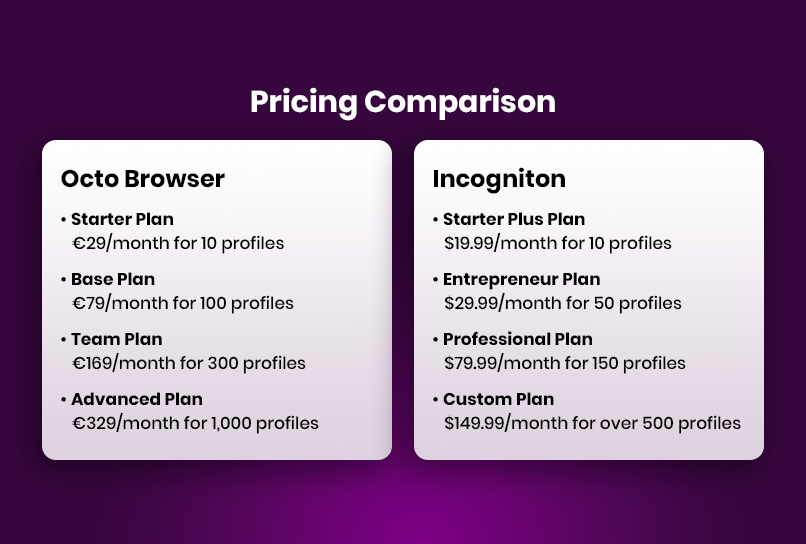
This is where Incogniton pulls clearly ahead. Here are both price lists as of September 2026.
Incogniton Pricing
Incogniton’s free Starter package gives you 10 profiles for the first 2 months, then 3 profiles, with no credit card required. Paid plans:
- Starter Plus: $19.99/month for 10 profiles.
- Entrepreneur: $29.99/month for 50 profiles, with API, Selenium/Puppeteer, Synchronizer and Cookie Collector.
- Professional: $79.99/month for 150 profiles and 3 team seats.
- Custom Package: from $149.99/month for 500+ profiles and 10 team seats, scalable up to 5,000 profiles.
Every plan includes free built-in proxies. Extra team seats cost $5/month. Pay for 6 months and save 30%, or pay yearly and save 40%.
Octo Browser Pricing
Octo Browser has no free desktop plan. Its plans (details) are priced in euros, excluding VAT:
- Lite Plan: €10/month for 3 profiles (no API, no add-ons).
- Starter Plan: €29/month for 10 profiles (max. 30 with paid add-ons, no API).
- Base Plan: €79/month for 100 profiles, with API, no team members.
- Team Plan: €169/month for 350 profiles and 3 team members.
- Advanced Plan: €329/month for 1,200 profiles and 8 team members.
Octo offers up to 30% off for annual billing (source). Proxies bought in its Proxy Shop and extra team members (€20–€25/month each) cost extra (source).
Which One Offers Better Value? The Math
Here is what you pay per month (monthly billing) for three typical setups:
- 10 profiles, solo: Incogniton is free for the first 2 months, then $19.99 (Starter Plus). Octo Browser costs €29 (Starter) from day one (source). Free built-in proxies are included with Incogniton. With Octo, proxies from the Proxy Shop are extra.
- 150 profiles with 3 team seats: Incogniton Professional costs $79.99. Octo’s Base plan (€79) has no team members, so you need its Team plan at €169 (source). That’s more than double the price, before proxies.
- 500 profiles with 10 team seats: Incogniton Custom Package costs $149.99. Octo’s Team plan tops out at 600 profiles and 6 members, so 10 seats means its Advanced plan: from €329 (1,200 profiles and 8 members, with extra members at €20 each) (source).
Octo’s prices are in euros and exclude VAT, and Incogniton’s are in US dollars. Even allowing for the currency difference, Incogniton costs less at every one of these tiers and includes free proxies on top. Where Octo does win is raw capacity at the very top end: its Advanced plan includes 1,200 profiles and can be expanded up to 100,000 (source). For most teams that’s more than enough headroom either way, because Incogniton’s Custom Package scales up to 5,000 profiles.
See Incogniton plans: team seats and proxies included → Or start free with 10 profiles for 2 months.
Where Octo Browser Falls Short
Octo Browser is a capable tool, but a few things stand out when you line up its plans against what you need day to day. Every point below comes from Octo’s own pricing page, documentation and policies as of September 2026.
- No free way to try it on desktop. There’s no free desktop plan or trial. The cheapest option is Lite at €10/month for just 3 profiles, without API access or add-ons (source). Its mobile apps are free during open testing, but desktop is where most multi-accounting happens.
- Automation and teamwork sit behind big price jumps. The API starts at €79/month and team members at €169/month. The €29 Starter plan caps out at 30 profiles, so outgrowing it means jumping to €79 (source).
- Tight API quotas, and no profile transfers on the cheaper plans. Lite and Starter include neither API access nor transferring profiles to another Octo account. Base (€79/month) adds both, but caps the API at 50 requests per minute and 500 requests per hour, about 8 requests a minute sustained over an hour (source). The caps apply to API calls, not to the pages your profiles browse, but if your scripts make many API calls, the hourly cap is the one you’ll hit first on Base.
- Extra seats cost more. Additional team members cost €25/month on the Team plan (max. 6) and €20/month on Advanced (source). With Incogniton, an extra seat costs $5/month.
- Proxies are a paid extra. The Proxy Shop sells third-party traffic with only a small free test allowance, and those purchases can’t be refunded (source).
- A 5-day, first-purchase-only refund window. You can request a refund within 5 days of your first purchase. All renewals, monthly or annual, are "strictly non-refundable", and a full refund requires that you haven’t created any profiles (source). Refunds are only possible for card, USDT or USDC payments (source).
- Discounted plans lock you in. 3-, 6- and 12-month subscriptions bought at a discount can’t be cancelled or refunded, and you can only downgrade after your current subscription ends (source).
- Fewer ways to pay. Octo works with a prepaid token balance topped up by card or crypto, and PayPal isn’t among its listed payment methods (source). Incogniton accepts PayPal, Visa, Mastercard, American Express and crypto.
Our Verdict: Octo Browser vs. Incogniton
Comparison Table for Incogniton and Octo Browser
| Evaluation Criteria | INCOGNITON | Octo Browser |
| Free plan | 10 profiles for 2 months, then 3; no credit card | No free desktop plan (source) |
| 10 profiles | Free for 2 months, then $19.99/month | €29/month (source) |
| 150 profiles + 3 seats | $79.99/month (Professional) | €169/month (Team: 350 profiles, 3 members) (source) |
| 500 profiles + 10 seats | $149.99/month (Custom Package) | From €329/month (Advanced: 1,200 profiles, 8 members; +€20 per extra member) (source) |
| Extra team seat | $5/month | €20–€25/month (source) |
| Proxies | Free built-in proxies on every plan | Paid Proxy Shop, small free test allowance (source) |
| API / automation from | $29.99/month (Selenium, Puppeteer, REST API) | €79/month (Base; API capped at 50 requests/minute and 500/hour) (source, quotas) |
| Profile transfer | Included from Entrepreneur ($29.99/month) | Base and up (€79/month); not on Lite or Starter (source) |
| Two-factor authentication (2FA) | Optional TOTP 2FA on every plan, including free | TOTP 2FA with backup codes (source) |
| Keep browsing data on your computer | Yes: turn off Cloud saving and cookies, logins, local storage and history stay on your computer (profile settings are stored on Incogniton’s servers) | Choose per profile which data is saved to Octo’s cloud storage (source) |
| Cloud storage region | Your choice: United States, Europe or Asia | European servers (source) |
| Synchronizer / Cookie tools | Synchronizer and Cookie Collector (Entrepreneur and up) | Cookie Robot (source) |
| Refunds | Try free for 2 months before paying | 5 days from first purchase only; renewals non-refundable (source) |
| Operating systems | Windows, macOS | Windows, macOS, Linux; iOS and Android apps in open testing (source) |
| Ease of use | Beginner-friendly (our view) | Feature-dense, more options to learn |
| Support | Live chat and email | Chat daily 09:00–01:00 (UTC+3) (source) |
| Trustpilot (Sept 2026) | 4.6/5 (208 reviews) | 4.3/5 (82 reviews) (source) |
| Company | Incogniton, the Netherlands | Blackbird Secure Browsing Ltd, United Kingdom (source) |
Octo Browser prices exclude VAT and are as of September 2026.
Choose Incogniton if you want to start free, need automation without paying €79 a month, work in a team, or simply want the best value as you scale. With team seats included, free built-in proxies, the Synchronizer and Cookie Collector, and an interface that’s easy to learn, Incogniton is our pick for most readers: solo marketers, e-commerce sellers, agencies and growing teams alike.
Consider Octo Browser only if you need Linux support, want native iOS or Android apps, or need more than 5,000 profiles, and you don’t mind paying premium prices for API access, seats and proxies.
Conclusion
Both Octo Browser and Incogniton are capable anti-detect browsers. But when you compare what you actually get for your money, Incogniton comes out ahead: a real free plan, API access from $29.99, 3 team seats for $79.99, extra seats for $5, and free built-in proxies on every plan. Add optional two-factor authentication on every plan and control over where your browsing data lives, and it’s an easy choice.
Try it yourself: set up your first profiles in minutes and see how Incogniton fits your workflow before you spend a cent.
Start free: 10 profiles for 2 months → No credit card required. Ready to scale? See plans with team seats and free proxies included.


