
Picking an anti-detect browser is easy when you run three accounts. It gets expensive when you run three hundred. In this Incogniton vs MoreLogin comparison, we look at what you actually pay at 10, 150 and 500 profiles, what’s included (proxies, team seats, security controls) and which tool gets you working fastest. We’ve compared Incogniton with GoLogin and AdsPower before; now it’s MoreLogin’s turn.
Who each tool is for: Incogniton is built for marketers, agencies and e-commerce teams who want free built-in proxies, a generous free start and team seats that scale without surprises. MoreLogin suits solo users and small teams on a tight budget who want the lowest entry price, need Linux, or want Android cloud phones alongside their desktop profiles.
Our verdict up front: for most readers, Incogniton is the better choice. You start with 10 free profiles for 2 months (MoreLogin’s free plan has 2), every Incogniton plan includes free built-in proxies (MoreLogin sells proxies separately), and a 10-person team with 500 profiles pays $149.99/month on Incogniton against $200/month on MoreLogin’s own price calculator (monthly billing, MoreLogin pricing, as of September 2026). To be fair: MoreLogin is cheaper at 10 and 150 profiles, and it also runs on Linux. If proxies, a bigger free start or a growing team matter to you, Incogniton is the smarter buy.
Start free: 10 profiles for 2 months → No credit card required. Or compare all Incogniton plans.
Evaluation Criteria
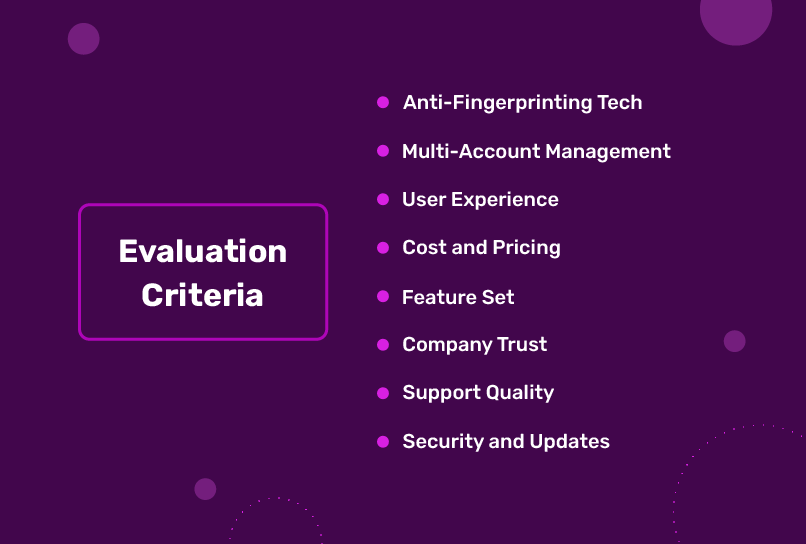
Whatever your use case, the same factors decide whether an anti-detect browser works for you. Here’s what we compared:
- Fingerprint management: realistic, separate browser fingerprints for every profile, without hours of manual tuning.
- Multi-account management: how easily you create, organize and scale profiles for marketing, e-commerce, scraping and more.
- Cost and pricing: the free plan, and what you really pay at 10, 150 and 500 profiles with team seats and proxies.
- Feature set: proxies, automation, cookie tools, collaboration and platform support.
- Security and data control: two-factor authentication, access controls and where your browsing data lives.
- Support: how you reach the team, and what other users say.
Incogniton vs MoreLogin: Head-to-Head
Fingerprint Management
Incogniton gives every new profile a realistic, unique browser fingerprint out of the box, covering canvas fingerprints and the many other attributes websites use to recognize a device. You can still adjust user agent, screen size, platform and dozens of other parameters per profile, but the defaults are designed so you don’t have to. That makes it one of the easiest ways to get a new account online.
MoreLogin markets what it calls a “real canvas fingerprint”, offers Chromium and Firefox kernels, and checks the profile’s IP when it launches (MoreLogin pricing page, as of September 2026). Both tools cover the fingerprinting basics; Incogniton’s strength is that you rarely need to touch the settings at all.
Multi-Account Management & Use Cases
Creating, launching, updating and organizing profiles is fast in Incogniton. Its feature set covers research, data scraping, e-commerce, affiliate marketing, social media management, crypto airdrop hunting and much more, and it scales from a free account to 5,000 profiles on the Custom Package.
MoreLogin also handles multi-account work, with batch profile creation, batch proxy and cookie import, and a synchronizer (source). It adds Android cloud phones for mobile-app tasks, billed separately from its desktop plans (more on those fees below).
Cost & Pricing
Incogniton offers a free Starter plan with 10 browser profiles for the first 2 months (3 profiles after that), with no credit card required. Every plan, including the free one, comes with free built-in proxies. Paying every 6 months saves 30%, and paying yearly saves 40%. The plans (as of September 2026):
- Starter - free, 10 browser profiles for the first 2 months, then 3; no credit card required.
- Starter Plus - $19.99/month, 10 browser profiles.
- Entrepreneur - $29.99/month, 50 browser profiles; adds Cookie Collector, Synchronizer, profile transfer, cookie export and Selenium/Puppeteer/REST API automation.
- Professional - $79.99/month, 150 browser profiles, 3 team seats and team roles.
- Custom Package - $149.99/month, 500 browser profiles and 10 team seats, scalable to 5,000 profiles. Extra seats are $5/month.
MoreLogin has a free plan with 2 profiles and 2 users, and one paid Pro plan whose price you build in a calculator: $9/month for 10 profiles and 2 users, plus a surcharge for more profiles and $5/month for every user beyond 2. Yearly billing takes 40% off, which is why the page advertises $5.40/month. The profile steps go 10, 20, 50, 100, 150, 200, 250, 400 and 1,000, and proxies are “available for purchase” rather than included (MoreLogin pricing, as of September 2026). Here’s what that means in practice:
| What you need | Incogniton | MoreLogin (calculator, as of September 2026) |
| 10 profiles, monthly billing | Starter Plus: $19.99, free built-in proxies included | Pro: $9, 2 users included; proxies sold separately |
| 150 profiles + 3 team seats, monthly billing | Professional: $79.99, 3 seats and proxies included | Pro: $9 + $36 (150 profiles) + $5 (3rd user) = $50; proxies sold separately |
| 500 profiles + 10 team seats, monthly billing | Custom Package: $149.99, 10 seats and proxies included | No 500 step, so the next option is 1,000 profiles: $9 + $151 + 8 extra users × $5 = $200; proxies sold separately |
| Same, billed yearly (per month) | $11.99 (10) · $47.99 (150 + 3 seats) · $89.99 (500 + 10 seats), 40% off | $5.40 (10) · $30 (150 + 3 users) · $120 (1,000 + 10 users), 40% off |
| Extra team seat | $5/month | $5/month per user beyond 2 |
| Proxies | Free built-in proxies on every plan, including free | Available for purchase |
| Free option | 10 profiles for 2 months, then 3; no credit card | 2 profiles and 2 users, forever |
MoreLogin figures are calculated with the official price calculator on its pricing page in September 2026. Incogniton yearly prices are the monthly price minus 40%. Cloud phones are billed separately by MoreLogin and are not included in these desktop prices.
The takeaway: MoreLogin wins on sticker price for solo users and mid-size setups. Incogniton gives you far more to start with for free (10 profiles for 2 months versus 2), includes proxies you’d otherwise buy separately, and becomes the cheaper option once a team reaches 500 profiles: $149.99 against $200 a month, or $89.99 against $120 on yearly billing.
See Incogniton plans: team seats and proxies included → Or start free with 10 profiles for 2 months.
User Experience
Both tools have a clean, modern interface. In our view, Incogniton is the more intuitive of the two: creating profiles, adding proxies and using automation are logically organized, and the learning curve is short even for people new to anti-detect browsers. Because proxies are built in, a new profile can be online in minutes.
MoreLogin is usable too, but some reviewers find parts of the workflow harder to discover. For example, adding proxies to profiles is not always straightforward for new users, as one G2 reviewer pointed out.
Getting started is simple with either tool: download the installer from Incogniton.com or MoreLogin.com, create an account and build your first profiles. Incogniton runs on Windows and macOS; MoreLogin runs on Windows, macOS and Linux (source).
Feature Set
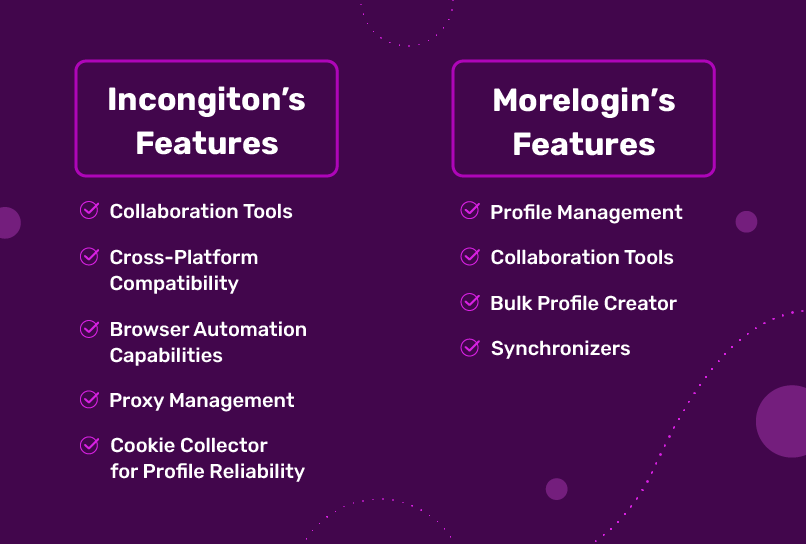
Incogniton’s standout features:
- Free built-in proxies on every plan, so you don’t need a separate proxy subscription to get started.
- Cookie Collector to warm up new profiles with cookies automatically, plus cookie export (Entrepreneur and up).
- Synchronizer to mirror your actions across many profiles (Entrepreneur and up).
- Selenium, Puppeteer and REST API automation (Entrepreneur and up).
- Team roles and permissions per member and group (Professional and up), with extra seats for $5/month.
MoreLogin lists a synchronizer, a local API with Selenium and Puppeteer, profile transfer, batch operations, proxy management and team collaboration among its plan features, plus Android cloud phones as a paid add-on (source). What it doesn’t include is proxies: those are an extra purchase.
Company and Support
Incogniton is developed in Amsterdam, the Netherlands, and launched publicly in 2020. More than 1 million people use it, and it holds a 4.6/5 rating on Trustpilot (208 reviews, September 2026). You can reach the team through live chat and email, backed by an extensive knowledge base.
MoreLogin is operated by EasyAnt Pte. Ltd., based in Singapore, and offers support by email, Telegram, WhatsApp and Messenger (MoreLogin contact page, as of September 2026).
Security and Data Control
Your anti-detect browser holds the keys to every account you manage, so it matters who can sign in and where your data lives. Incogniton gives you these controls:
- Two-factor authentication on every plan. Optional TOTP 2FA works with any authenticator app, on every plan, including the free one.
- Keep browsing data on your computer. Turn off Cloud saving and your browsing data (cookies, saved logins, local storage and history) stays on your own computer. Profile settings and fingerprint configuration are still stored on Incogniton’s servers.
- Choose your storage region. US, EU or Asia.
- Session control. See every device where you’re signed in, and log out of all of them in one click.
- Team permissions. Role-based permissions per member and per group.
- Safer transfers. Profile data moves over HTTPS with short-lived signed links.
MoreLogin has invested in security too. Its Security Center offers 2FA via an authenticator app or email with three verification levels, a login IP allowlist, profile encryption with your own key, and role-based password protection (MoreLogin Security Center, August 2026). Its Global Settings let teams switch syncing of cookies, extensions and cached data on or off (Setting Center).
| Security and data control | Incogniton | MoreLogin (as of September 2026) |
| Two-factor authentication | Optional TOTP with any authenticator app, on every plan including free | Authenticator app or email, low/medium/high levels (source) |
| Keep browsing data on your computer | Yes: turn off Cloud saving and cookies, saved logins, local storage and history stay on your computer (profile settings stay in the cloud) | Separate sync switches for cookies, extensions and cached data (source) |
| Choose storage region | US, EU or Asia | — |
| Signed-in devices, log out everywhere | Yes, in one click | — |
| Team permissions | Role-based, per member and group | Roles with group or per-profile authorization (source) |
| Other account controls | HTTPS transfers with short-lived signed links | Login IP allowlist, profile encryption with your own key (source) |
Where MoreLogin Falls Short
MoreLogin is a legitimate tool with a low entry price. The trade-offs show up in the small print. All facts below are as of September 2026.
- Idle cloud phones keep costing money. MoreLogin’s pay-per-minute cloud phones cost $0.006 per minute with a $1.50 daily cap per phone, and a phone that has not been started for 7 consecutive days incurs an extra $0.03 per 24 hours in storage fees, according to MoreLogin’s own fee overview. Keeping unused mobile environments around is not free: at that rate, 100 idle phones over 30 chargeable days cost $90 in storage fees alone. This applies to pay-per-minute cloud phones only, not to desktop browser profiles. The monthly rental option ($25 per cloud phone per 30 days on the same page; $23–$25 on the pricing page) has no extra storage fee. Check the billing mode carefully before you scale.
- Proxies aren’t included. MoreLogin lists proxies as “available for purchase” (source). Every Incogniton plan, including the free one, comes with free built-in proxies.
- A small free plan. 2 profiles and 2 users (source), against 10 profiles for 2 months (then 3) on Incogniton.
- Big jumps at scale. The calculator has no step between 400 and 1,000 profiles, so a 500-profile team pays for 1,000: $160/month before extra users (source). Incogniton’s Custom Package covers 500 profiles and 10 seats for $149.99.
Incogniton vs MoreLogin: Full Comparison Table
| Evaluation criteria | Incogniton | MoreLogin (as of September 2026) |
| Free plan | 10 profiles for 2 months, then 3; no credit card | 2 profiles, 2 users (source) |
| 10 profiles (monthly) | $19.99, proxies included | $9, proxies extra (source) |
| 150 profiles + 3 seats (monthly) | $79.99, proxies included | $50, proxies extra (source) |
| 500 profiles + 10 seats (monthly) | $149.99, proxies included | $200 (1,000-profile step), proxies extra (source) |
| Built-in proxies | Free on every plan | Available for purchase |
| Operating systems | Windows, macOS | Windows, macOS, Linux (source) |
| Automation | Selenium, Puppeteer, REST API, Synchronizer (Entrepreneur and up) | Local API, Selenium, Puppeteer, synchronizer (source) |
| Cookie tools | Cookie Collector and cookie export (Entrepreneur and up) | Batch cookie import (source) |
| Mobile environments | — | Android cloud phones, billed separately (source) |
| Two-factor authentication | Optional TOTP on every plan, including free | Authenticator app or email (source) |
| Keep browsing data on your computer | Yes (Cloud saving off) | Sync switches for cookies, extensions, cache (source) |
| Support | Live chat and email; Trustpilot 4.6/5 (208 reviews) | Email, Telegram, WhatsApp, Messenger (source) |
| Company | Amsterdam, the Netherlands | EasyAnt Pte. Ltd., Singapore (source) |
Verdict: Incogniton or MoreLogin?
Choose Incogniton if you want to get working straight away with proxies included, start with 10 free profiles instead of 2, or run a team that is heading towards hundreds of profiles. That’s most of our readers. You get free built-in proxies on every plan, the Cookie Collector and Synchronizer, 2FA on every plan including free, control over whether your browsing data leaves your computer, and a 500-profile, 10-seat plan that costs less than MoreLogin’s equivalent.
Consider MoreLogin only if you want the lowest price for up to a few hundred profiles and already pay for your own proxies, you need Linux, or you specifically need Android cloud phones.
Start free: 10 profiles for 2 months → No credit card required. Ready to scale? See plans with team seats and free proxies included.