
Whether you’re running affiliate campaigns, managing paid ads, or growing your clients’ social media presence, one or a few accounts can only take you so far. But creating and managing multiple social media accounts without getting detected is more challenging than ever.
So, how do you ensure efficient, uninterrupted social media management at scale?
Switching regular browsers or using Incognito mode is not enough to stay under the radar. This is when Incogniton and IPRoyal proxies come into play. By combining this powerful anti-detect browser with IPRoyal’s reliable proxies, you can keep your accounts separate and safe from bans.
Here’s how this combo can help you scale Facebook advertising, run affiliate campaigns, and grow social media presence without risking bans or blocks.
Why Multiple Accounts Are Risky
Social media platforms like Facebook and Instagram allow a specific number of accounts per user. Whether that’s one, three, or five accounts, it limits your advertising, marketing, and account management workflows.
These platforms track users’ IP addresses, browser fingerprints, cookies, and login patterns to ensure everyone sticks to the allowed account limits. This is why creating or managing multiple accounts with traditional methods can quickly get you flagged.
Incognito mode or switching between standard browsers only clears cookies. It doesn’t mask your IP address or unique browser fingerprints such as your OS, device model, browser version, etc. That means platforms can easily link multiple accounts to the same user or IP, leading to account and IP bans.
While account bans can pause your campaigns and block access to specific client accounts, IP bans are even worse. They can temporarily or permanently prevent you from accessing and using all your accounts on that specific platform and network, and even from creating new ones.
This can lead to lost revenue, missed opportunities and clients, and wasted time trying to fix the problem.
On the other hand, having multiple accounts is essential for scaling ad campaigns, testing various geolocations, tracking affiliate conversions across channels, and managing multiple clients or brands efficiently. This is why you need tools that truly separate each account and mask your identity online.
Enter Incogniton and IPRoyal proxies.
What Incogniton Does
Incogniton is an anti‑detect browser that keeps you anonymous when managing multiple accounts on various platforms. Unlike regular browsers, which share cookies, cache, and digital fingerprints across tabs or profiles, Incogniton lets you create fully isolated browser profiles.
The profiles are easy to configure and manage, letting you customize browser fingerprint parameters like OS details, browser version, screen resolution, plugins, and more. Since each profile can have its own unique fingerprint, storage, and settings, it can behave like a separate user on a separate device.
This makes it much harder for social media platforms to link your accounts. However, besides your browser fingerprints, you also need to mask your IP to keep your accounts separate. Hence, the need for proxies.
Since Incogniton doesn’t include dedicated proxies by itself, you need to pair it with reliable proxy servers. This is when IPRoyal comes in.
Why You Need Premium Proxies
Proxy servers use their own IP address to connect you to target platforms, keeping your original IP protected. However, free or public proxy servers tend to be slow, unreliable, and unsafe.
Their IPs are usually shared between hundreds or even thousands of people at the same time, resulting in sluggish connections and accounts linked with each other. Since these IPs are either heavily shared or coming from abused networks, they are often flagged as suspicious, increasing the risk of account linking and bans.
What’s more, anyone can use free proxies for any purpose - legal or not. Therefore, using them can make you feel the consequences of other malicious proxy users.
While proxies are supposed to improve your privacy, free or public proxy servers can expose your original IP address. In other words, they can easily get your accounts flagged or banned on various social media platforms.
This is why you should only pair Incogniton with premium proxies like IPRoyal’s. This proxy service provides access to clean, trustworthy IPs, indistinguishable from real human traffic. With IPRoyal, you get:
- Over 32M ethically sourced, residential IPs that look like real users
- Sticky and rotating sessions to mimic real user behavior
- Geo-targeting options to align accounts with specific countries or cities
- Low block rates and high anonymity for long-term account privacy
- Flexible plans with unlimited traffic, zero traffic limits, and bulk discounts
While IPRoyal provides all major proxy types, their ISP Proxies are ideal for social media management at scale. These proxies have static IPs dedicated to one user at a time, high speeds, and unlimited bandwidth, giving you everything you need for stability, anonymity, and cost-efficiency when scaling social media management.
You can also use their reliable Residential Proxies, especially for automation. They can change your IP after each request, mimicking real user behavior. With access to a global network of rotating residential IPs and non-expiring traffic, you can count on efficient automation at scale.
How to Integrate IPRoyal Proxies with Incogniton
Integrating IPRoyal proxies with Incogniton is pretty straightforward. Follow the steps below to start using this powerful combination in minutes.
Step #1: Create an IPRoyal account and order proxies.

Choose Residential Proxies for undetected automation or ISP Proxies for efficient social media management.
Step #2: Log in to Incogniton.

Step #3: Open Profile Management and add a new profile.

Step #4: Set up your proxies in the IPRoyal dashboard and copy your proxy credentials (IP, port, username, password).

Step #5: Paste your proxy credentials into Incogniton (Proxy tab).

Step #6: Verify your proxy works by testing the IP location with the Check proxy button.
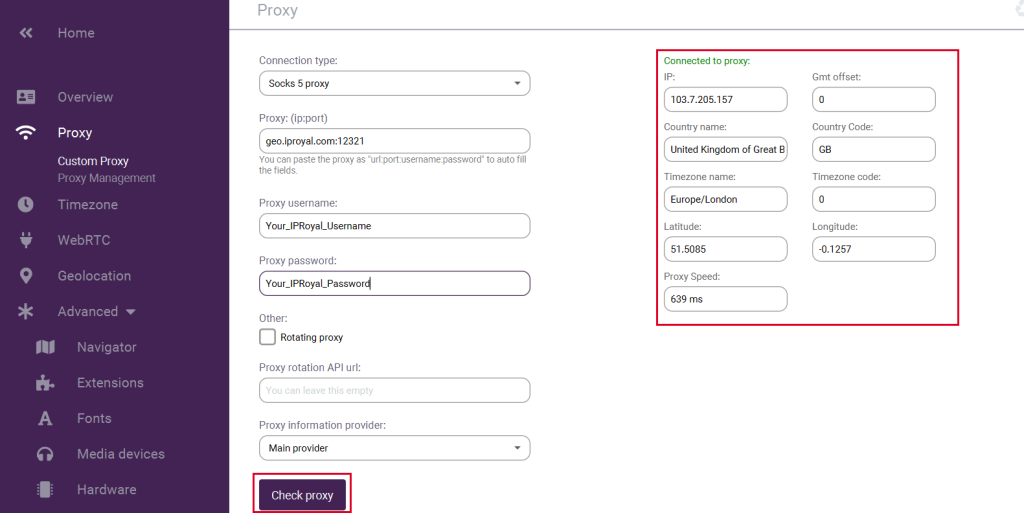
Step #7: Once you make sure your proxy works, create a profile.

Step #8: Launch a profile to open a fully isolated browser environment using your profile settings.

By integrating IPRoyal proxies with Incogniton, each account looks like it’s run by a different person, in a different location, using a unique device. This reduces detection risks and improves account stability so you can focus on what really matters for your business.
Use Cases: Social Media, Advertising & Affiliate Marketing
Combining Incogniton with IPRoyal’s proxies ensures ultimate privacy and efficiency for your multi-account operations. You can set up an unlimited number of accounts on various platforms and manage them from a single device with minimal risk of detection and blocks.
Here are the most popular use cases for Incogniton and IPRoyal’s proxies.
Scaling Facebook Advertising Accounts
When managing multiple ad accounts, keeping each one separate is crucial to avoid being linked. Assigning a dedicated Incogniton profile with its own IPRoyal proxy ensures each account runs from a unique browser environment and IP address.
This setup lets you scale campaigns safely while reducing the risk of bans or restrictions.
Affiliate Marketing at Scale
Affiliate workflows include testing multiple offers, funnels, and regions at the same time. Separate browser profiles and proxies allow each setup to function independently from others. This helps you avoid IP overlap and makes performance tracking and regional testing more consistent.
Client Social Media Management
Agencies, SMM teams, and freelancers have to manage multiple client accounts from a single device on a regular basis. Assigning each client a separate Incogniton browser profile and IPRoyal proxy keeps logins, activity, and data isolated.
This, in turn, helps maintain account stability and simplify daily management, no matter how many brands or clients you handle.
Best Practices for Safe, Long‑Term Use
Incogniton and IPRoyal’s proxies can be the perfect tools for your workflows, but long-term account stability depends on how you use them. Here are a few tips to make the most of them and keep your multi-account operations uninterrupted.
- Use one proxy per profile or account to keep them separate
- Check your proxy before using it to make sure it works correctly
- Warm up new profiles gradually by performing organic actions before heavy automation
- Keep one account per browser profile to avoid mixing cookies, fingerprints, or session data
- Adjust session stickiness based on activity frequency to match natural login behavior
- Maintain consistent locations and device settings to reduce suspicious activity signals
- Monitor account behavior and alerts to detect issues before they escalate
Conclusion
If you want to manage multiple social media accounts without worrying about account limitations, geo-restrictions, or bans, you need the right privacy tools. Incognito mode and regular browsers can’t keep your accounts separated and undetected. You need a robust anti-detect browser and reliable proxies.
Using Incogniton with IPRoyal proxies creates a unique, isolated environment for each account. This setup allows you to manage multiple accounts, scale, automate, and focus on growing your affiliate revenue without risking bans.
Try IPRoyal Residential or ISP proxies with Incogniton and take your social media operations to the next level.